Generate a Textbook Condition/Status report (Resource Manager)
The Textbook Condition/Status report gives you information on the numbers and replacement prices of your textbook copies, grouped by each condition or status. You can also learn your textbooks' current actual value and/or the cost of replacing them.
To generate the report:
- Select Reports > Resource Reports.
- Under Catalog -- Resources & Items, click Textbook Condition/Status. The report setup page appears.
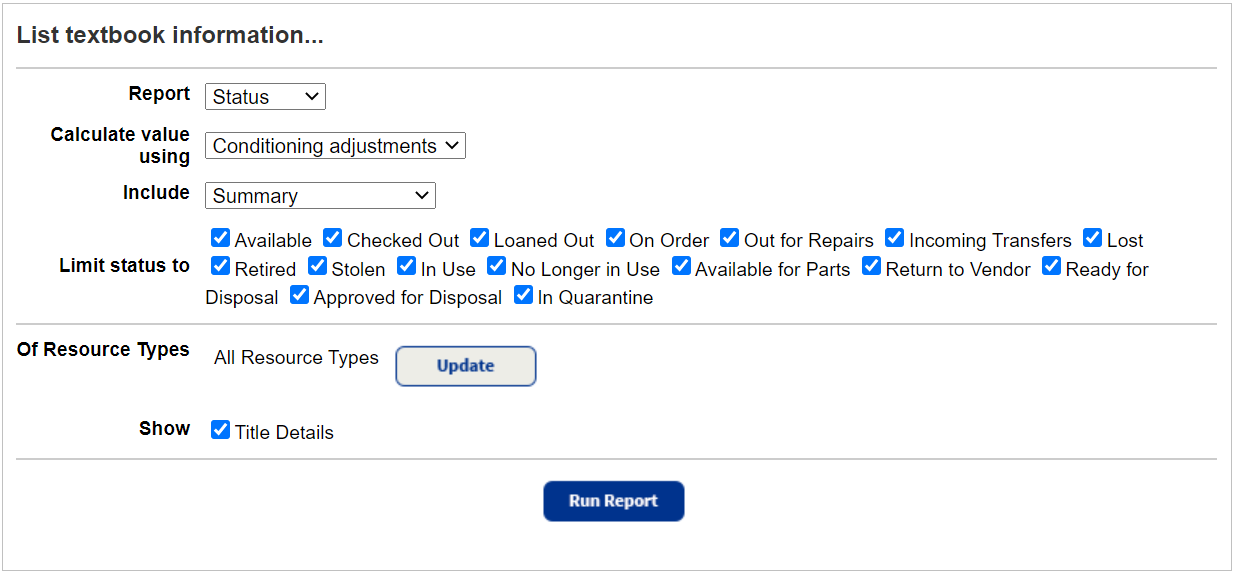
- Do any of the following:
- Use the Report drop-down to select either the Condition or Status report type.
- (Optional) If you are a district textbooks manager, use the For drop-down to select the district, a site-type group, or an individual site.
- In the Calculate value using drop-down, select one of the following:
- Conditioning adjustments: Lists the textbooks' current depreciated value.
To calculate this value, the report takes the automatic conditioning information entered in Resource Policies and the number of circulations each textbook has had. - Replacement price: Lists the amount it would take to replace the textbooks.
The report retrieves this value from the title record. - Both: Lists the Conditioning Total and Replacement Price.
- Conditioning adjustments: Lists the textbooks' current depreciated value.
- Use the Include drop-down to include:
- Summary
- Item Budget Category
- Publisher
- Vendor
- Use the Limit Condition to or Limit status to checkboxes to choose the conditions or statuses to report on.
Conditions Statuses New Available Good Checked Out Fair Out for Repairs Poor Lost Unusable
- To filter the report to branches of the Textbooks template:
- Next to Of Resources Type, click Update.
- Select the branches you want.
- Click OK.
- To include a list of the individual titles in each group, select the Title Details checkbox.
- Click Run Report. Report Manager appears.
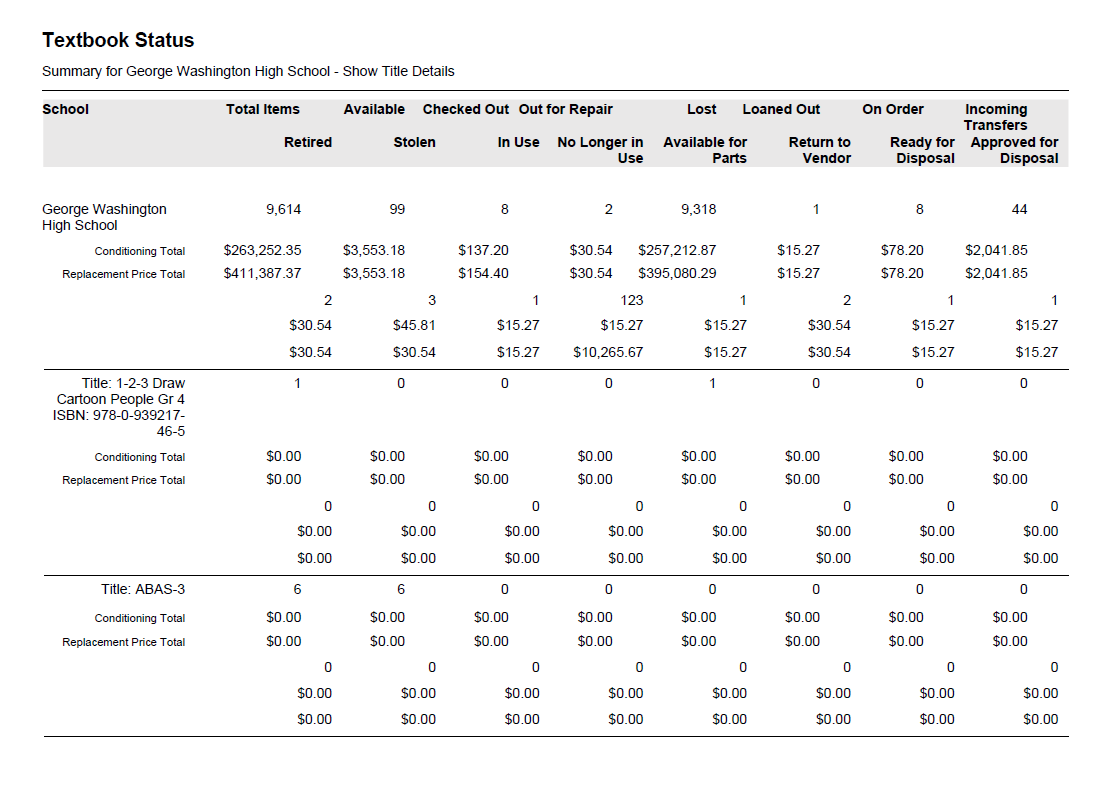
- When the report status is Completed, click View.
 Additional Details
Summary
The summary report lists the following information:
- Total number of copies by school
- Total value of textbooks (replacement price, depreciated value, or both)
- For each included condition or status, a column containing subtotals for the quantity of copies and total price and/or value for that condition or status
- If generated by a district textbooks manager:
- The district or site-type group name
- The total number of copies in the district or group
- Their total values (replacement price, depreciated value, or both)
If you included copy budget categories, publishers, or vendors, the report groups each school's holdings by those categories and includes subtotals for each one.
If you limited the report to just one copy budget category, publisher, or vendor, the report includes information for just that one.
If you included title details, each title is listed under its school, or under its copy budget category, publisher, or vendor (if included), with its quantities and total price and/or value.
If any of the textbook title records do not have the publisher, vendor, or copy budget category defined, and you choose to include one of those options, those titles appear on the report under Other.
For any textbook title records that do not have a replacement price, a zero amount is added to the total price. The report does not calculate any averages.
Report Uses
Use this report to:
- View the statistics on the condition and cost of your textbooks.
- Generate a list of unusable copies when removing them from your textbook inventory.
- Discover your poor and unusable copies sorted by:
- Copy budget categories to aid in determining where you will require funds for new textbooks.
- Publisher or vendor to distribute to purchasing personnel for new textbook orders.
- Find the number of available copies for mid-year inventories.
Sort Order
The report is sorted alphabetically. If the report includes multiple groupings or categories, items are sorted alphabetically under the grouping.